
       [](code_of_conduct.md)
## What is this?
This is a project to create a federated social network based on the [Lysand](https://lysand.org) protocol. It is currently in alpha phase, with basic federation and almost complete Mastodon API support.
This project aims to be a fully featured social network, with a focus on privacy, security, and performance. It implements the Mastodon API for support with clients that already support Mastodon or Pleroma.
> [!NOTE]
> This project is not affiliated with Mastodon or Pleroma, and is not a fork of either project. It is a new project built from the ground up.
## Features
- [x] Inbound federation
- [x] Hyper fast (thousands of HTTP requests per second)
- [x] S3 or local media storage
- [x] Deduplication of uploaded files
- [x] Federation limits
- [x] Configurable defaults
- [x] Full regex-based filters for posts, users and media
- [x] Custom emoji support
- [x] Automatic image conversion to WebP or other formats
- [x] Scripting-compatible CLI with JSON and CSV outputs
- [ ] Moderation tools
- [ ] Full Mastodon API support
- [ ] Outbound federation
## Screenshots
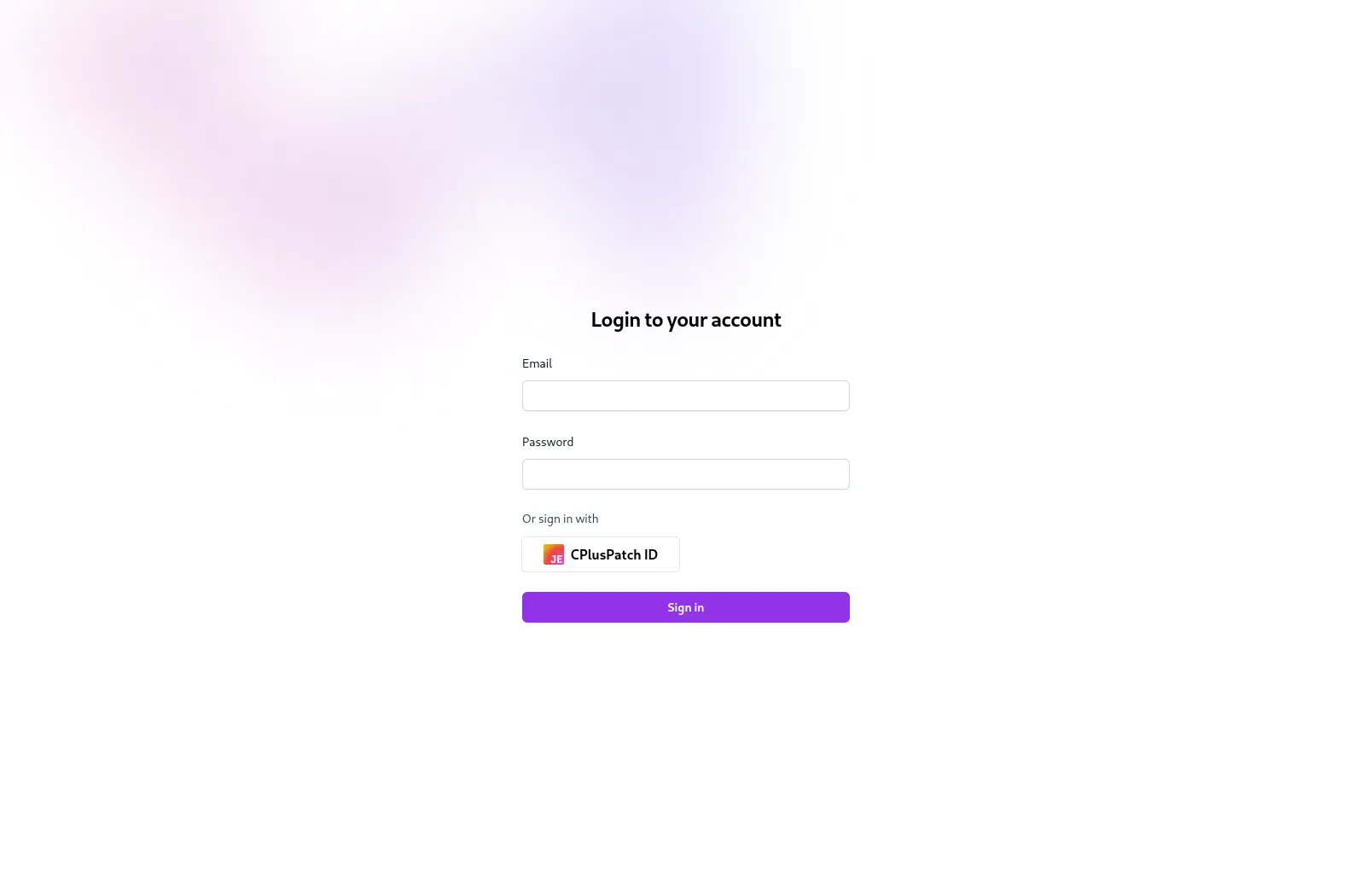
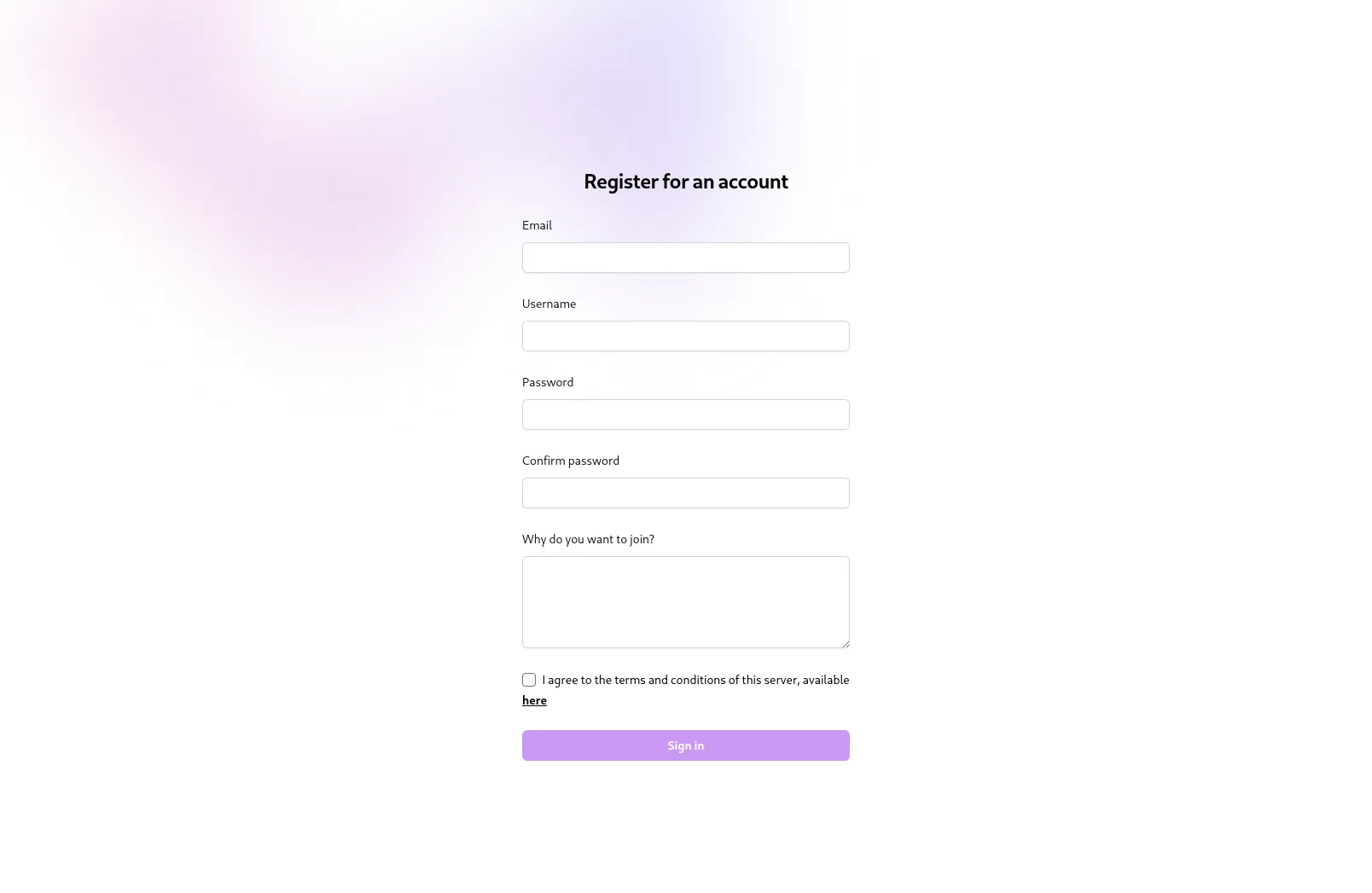
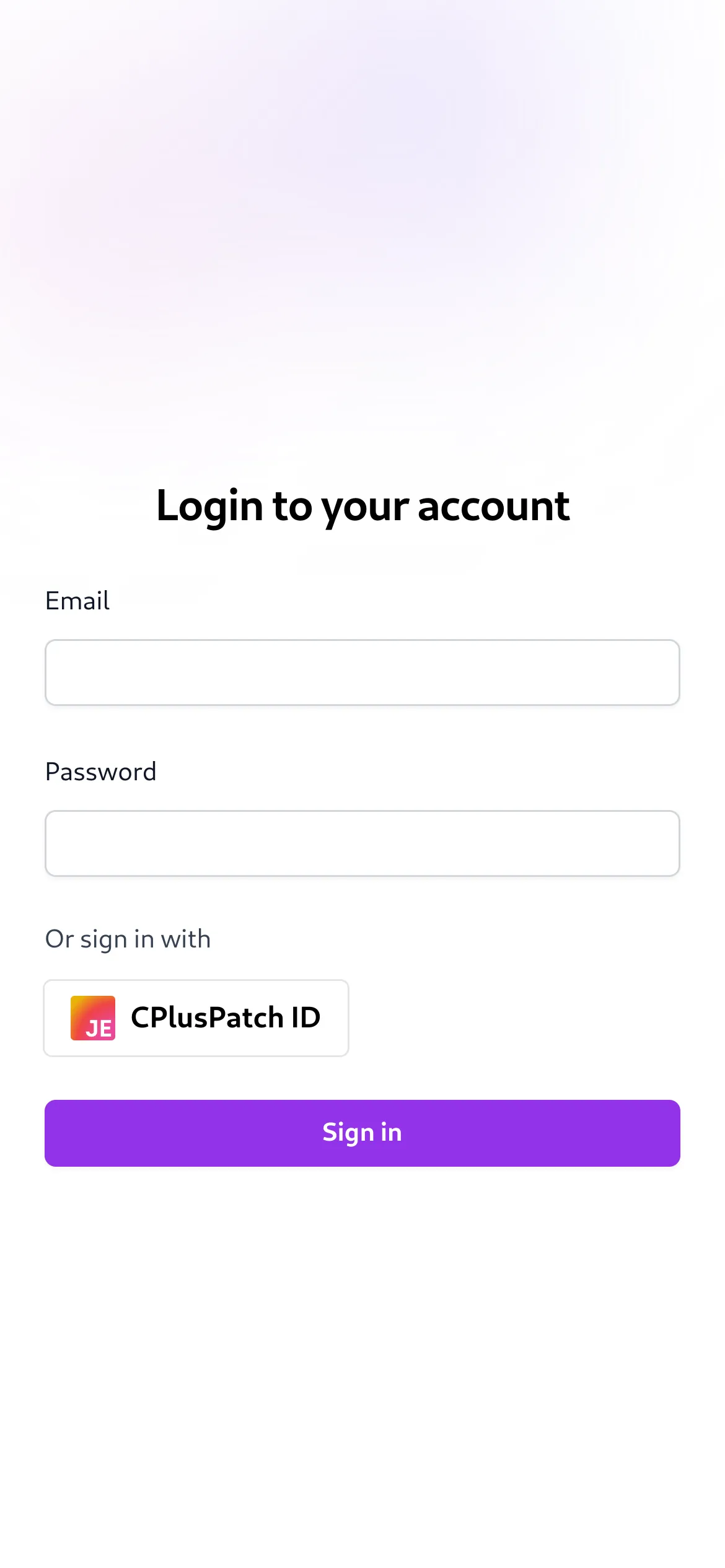
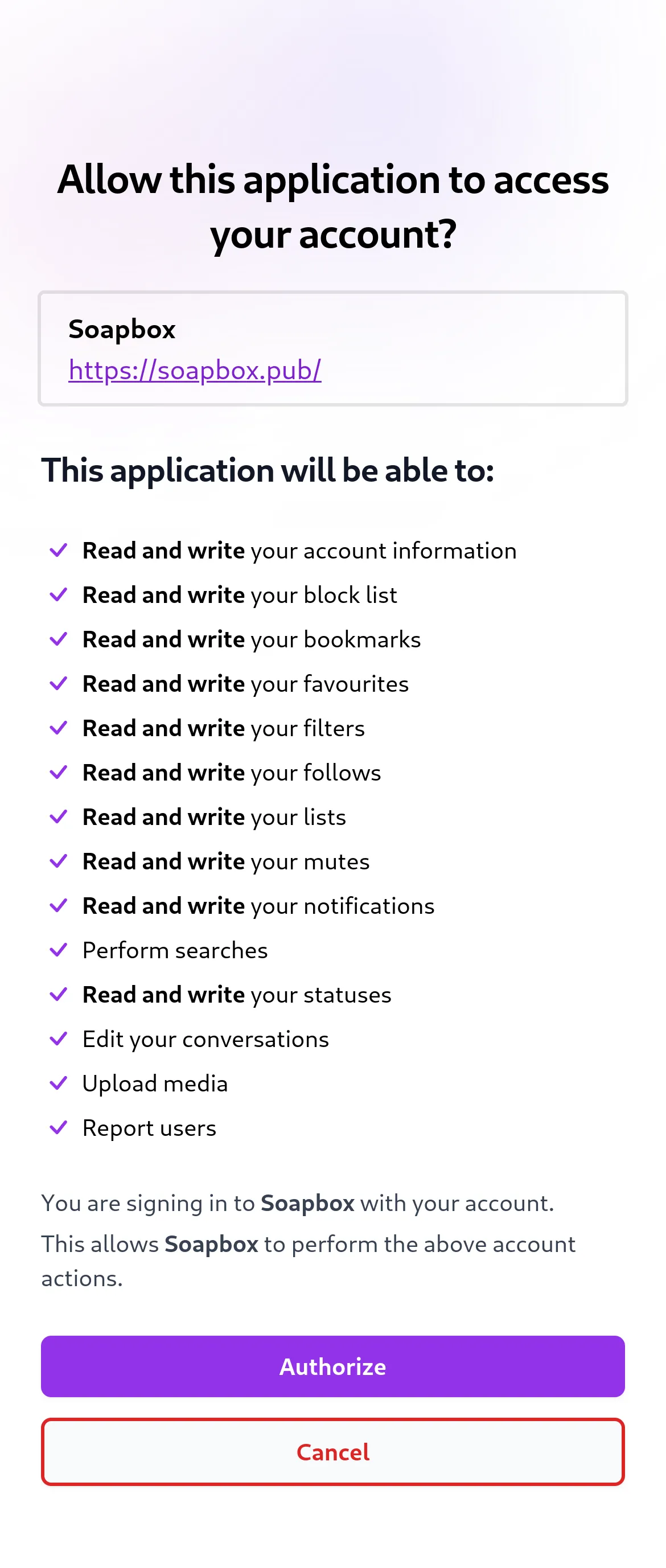
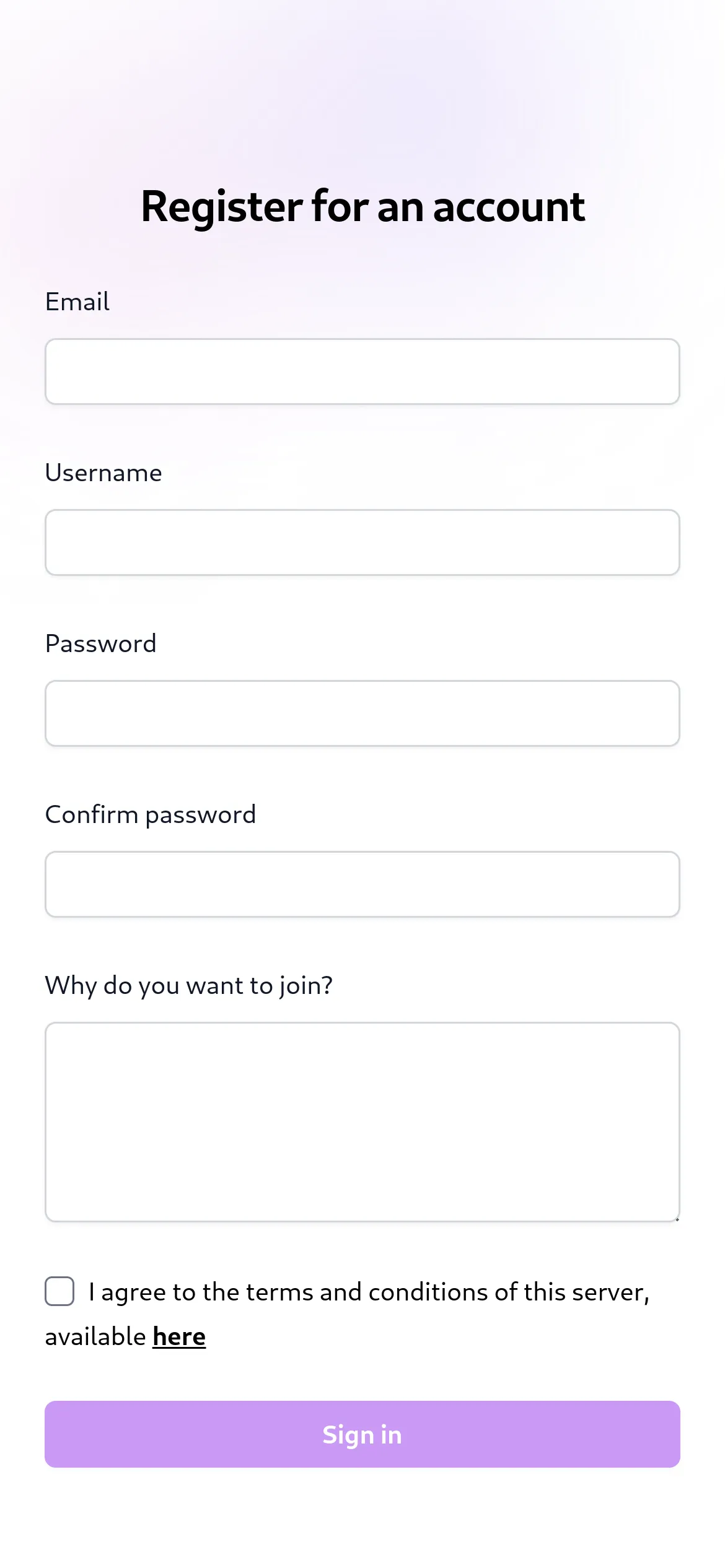
Here are some screenshots of Lysand's built-in web client. This client is built with Vue, and serves to allow users to log in or register. It is kept to only the actions that cannot be done with a Mastodon client, to simplify development. In the future, there may be a full-featured client.
### On Desktop
#### Welcome Page

#### Logging In
#### OAuth Confirmation

#### Registration Page
#### Home Timeline

### On Mobile
#### Logging In
 #### OAuth Confirmation
 #### Registration Page
 ## Benchmarks
> [!NOTE]
> These benchmarks are not representative of real-world performance, and are only meant to be used as a rough guide. Load, and therefore performance, will vary depending on the server's hardware and software configuration, as well as user activity.
### Timeline Benchmarks
You may run the following command to benchmark the `/api/v1/timelines/home` endpoint:
```bash
TOKEN=token_here bun benchmark:timeline
```
The `request_count` variable is optional and defaults to 100. `TOKEN` is your personal user token, used to login to the API.
On a quad-core laptop:
```
$ bun run benchmarks/timelines.ts 100
✓ All requests succeeded
✓ 100 requests fulfilled in 0.12611s
```
```
$ bun run benchmarks/timelines.ts 1000
✓ All requests succeeded
✓ 1000 requests fulfilled in 0.90925s
```
```
$ bun run benchmarks/timelines.ts 10000
✓ All requests succeeded
✓ 10000 requests fulfilled in 12.44852s
```
Lysand is extremely fast and can handle thousands of HTTP requests per second on a good server.
## How do I run it?
### Requirements
- The [Bun Runtime](https://bun.sh), version 1.0.30 or later (usage of the latest version is recommended)
- A PostgreSQL database
- (Optional but recommended) A Linux-based operating system
- (Optional if you want search) A working Meiliseach instance
> [!WARNING]
> Lysand has not been tested on Windows or MacOS. It is recommended to use a Linux-based operating system to run Lysand.
>
> We will not be offerring support to Windows or MacOS users. If you are using one of these operating systems, please use a virtual machine or container to run Lysand.
### Installation
1. Clone this repository
```bash
git clone https://github.com/lysand-org/lysand.git
```
2. Install the dependencies
```bash
bun install
```
3. Set up a PostgreSQL database, using the `pg_uuidv7` extension
Lysand offers a pre-made Docker image for PostgreSQL with the extension already installed. Use `ghcr.io/lysand-org/postgres:main` as your Docker image name to use it.
You may otherwise use this [Dockerfile](Postgres.Dockerfile) to set it up.
1. Copy the `config.toml.example` file to `config.toml` and fill in the values (you can leave most things to the default, but you will need to configure things such as the database connection)
2. Run migrations:
```bash
bun migrate
```
6. (If you want search)
Create a Meilisearch instance (using Docker is recommended). For a [`docker-compose`] file, copy the `meilisearch` service from the [`docker-compose.yml`](docker-compose.yml) file.
Set up Meiliseach's API key by passing the `MEILI_MASTER_KEY` environment variable to the server. Then, enale and configure search in the config file.
7. Build everything:
```bash
bun prod-build
```
You may now start the server with `bun start`. It lives in the `dist/` directory, all the other code can be removed from this point onwards.
In fact, the `bun start` script merely runs `bun run dist/index.js --prod`!
### Running
To run the server, simply run the following command:
```bash
bun start
```
### Using the CLI
Lysand includes a built-in CLI for managing the server. To use it, simply run the following command:
```bash
bun cli help
```
If you are running a production build, you will need to run `bun run dist/cli.js` or `./entrypoint.sh cli` instead.
You can use the `help` command to see a list of available commands. These include creating users, deleting users and more. Each command also has a `--help,-h` flag that you can use to see more information about the command.
#### Scripting with the CLI
Some CLI commands that return data as tables can be used in scripts. To convert them to JSON or CSV, some commands allow you to specify a `--format` flag that can be either `"json"` or `"csv"`. See `bun cli help` or `bun cli -h` for more information.
Flags can be used in any order and anywhere in the script (except for the `bun cli` command itself). The command arguments themselves must be in the correct order, however.
### Rebuilding the Search Index
You may use the `bun cli index rebuild` command to automatically push all posts and users to Meilisearch, if it is configured. This is useful if you have just set up Meilisearch, or if you accidentally deleted something.
### Using Database Commands
The `bun prisma` commands allows you to use Prisma commands without needing to add in environment variables for the database config. Just run Prisma commands as you would normally, replacing `bunx prisma` with `bun prisma`.
## With Docker
> [!NOTE]
> Docker is currently broken, as Bun with Prisma does not work well with Docker yet for unknown reasons. The following instructions are for when this is fixed.
>
> These instructions will probably also work with Podman and other container runtimes.
You can also run Lysand using Docker. To do so, you can:
1. Acquire the Postgres Dockerfile from above
2. Use this repository's [`docker-compose.yml`](docker-compose.yml) file
3. Create the `lysand-net` docker network:
```bash
docker network create lysand-net
```
1. Fill in the config file (see [Installation](#installation))
2. Run the following command:
```bash
docker-compose up -d
```
You may need root privileges to run Docker commands.
### Running CLI commands inside Docker
You can run CLI commands inside Docker using the following command:
```bash
sudo docker exec -it lysand sh entrypoint.sh cli ...
```
### Running migrations inside Docker
You can run migrations inside Docker using the following command (if needed):
```bash
sudo docker exec -it lysand sh entrypoint.sh prisma migrate deploy
```
## Contributing
Contributions are welcome! Please see the [CONTRIBUTING.md](CONTRIBUTING.md) file for more information.
## Planned Extra Features
- Send notifications to moderators when a report is received
- Email notifications on certain actions
## Federation
> [!WARNING]
> Federation has not been tested outside of automated tests. It is not recommended to use this software in production.
The following extensions are currently supported or being worked on:
- `org.lysand:custom_emojis`: Custom emojis
## API
Lysand implements the Mastodon API, with some extensions. The API is currently in early alpha, and is not recommended for use in production.
Working endpoints are:
- `/api/v1/accounts`
- `/api/v1/accounts/:id`
- `/api/v1/accounts/:id/statuses`
- `/api/v1/accounts/:id/follow`
- `/api/v1/accounts/:id/unfollow`
- `/api/v1/accounts/:id/block`
- `/api/v1/accounts/:id/unblock`
- `/api/v1/accounts/:id/mute`
- `/api/v1/accounts/:id/unmute`
- `/api/v1/accounts/:id/pin`
- `/api/v1/accounts/:id/unpin`
- `/api/v1/accounts/:id/note`
- `/api/v1/accounts/:id/remove_from_followers`
- `/api/v1/accounts/relationships`
- `/api/v1/accounts/update_credentials`
- `/api/v1/accounts/verify_credentials`
- `/api/v1/accounts/familiar_followers`
- `/api/v1/profile/avatar` (`DELETE`)
- `/api/v1/profile/header` (`DELETE`)
- `/api/v1/statuses/:id` (`GET`, `DELETE`)
- `/api/v1/statuses/:id/context`
- `/api/v1/statuses/:id/favourite`
- `/api/v1/statuses/:id/unfavourite`
- `/api/v1/statuses/:id/favourited_by`
- `/api/v1/statuses/:id/reblogged_by`
- `/api/v1/statuses/:id/reblog`
- `/api/v1/statuses/:id/unreblog`
- `/api/v1/statuses/:id/pin`
- `/api/v1/statuses/:id/unpin`
- `/api/v1/statuses`
- `/api/v1/timelines/public`
- `/api/v1/timelines/home`
- `/api/v1/apps`
- `/api/v1/instance`
- `/api/v1/custom_emojis`
- `/api/v1/apps/verify_credentials`
- `/oauth/authorize`
- `/oauth/token`
- `/api/v1/blocks`
- `/api/v1/mutes`
- `/api/v2/media`
- `/api/v1/notifications`
Tests needed but completed:
- `/api/v1/media/:id`
- `/api/v2/media`
- `/api/v1/favourites`
- `/api/v1/accounts/:id/followers`
- `/api/v1/accounts/:id/following`
- `/api/v2/search`
Endpoints left:
- `/api/v1/reports`
- `/api/v1/accounts/:id/lists`
- `/api/v1/follow_requests`
- `/api/v1/follow_requests/:account_id/authorize`
- `/api/v1/follow_requests/:account_id/reject`
- `/api/v1/follow_suggestions`
- `/api/v1/domain_blocks` (`GET`, `POST`, `DELETE`)
- `/api/v2/filters` (`GET`, `POST`)
- `/api/v2/filters/:id` (`GET`, `PUT`, `DELETE`)
- `/api/v2/filters/:filter_id/keywords` (`GET`, `POST`)
- `/api/v2/filters/keywords/:id` (`GET`, `PUT`, `DELETE`)
- `/api/v2/filters/:filter_id/statuses` (`GET`, `POST`)
- `/api/v2/filters/statuses/:id` (`GET`, `DELETE`)
- `/api/v1/endorsements`
- `/api/v1/featured_tags` (`GET`, `POST`)
- `/api/v1/featured_tags/:id` (`DELETE`)
- `/api/v1/featured_tags/suggestions`
- `/api/v1/preferences`
- `/api/v1/followed_tags`
- `/api/v2/suggestions`
- `/api/v1/suggestions/:account_id` (`DELETE`)
- `/api/v1/tags/:id`
- `/api/v1/tags/:id/follow`
- `/api/v1/tags/:id/unfollow`
- `/api/v1/statuses/:id/translate`
- `/api/v1/statuses/:id/bookmark`
- `/api/v1/statuses/:id/unbookmark`
- `/api/v1/statuses/:id/mute`
- `/api/v1/statuses/:id/unmute`
- `/api/v1/statuses/:id` (`PUT`)
- `/api/v1/statuses/:id/history`
- `/api/v1/statuses/:id/source`
- `/api/v1/polls/:id`
- `/api/v1/polls/:id/votes`
- `/api/v1/scheduled_statuses`
- `/api/v1/scheduled_statuses/:id` (`GET`, `PUT`, `DELETE`)
- `/api/v1/timelines/tag/:hashtag`
- `/api/v1/timelines/list/:list_id`
- `/api/v1/conversations`
- `/api/v1/conversations/:id`
- `/api/v1/conversations/:id/read`
- `/api/v1/lists` (`GET`, `POST`)
- `/api/v1/lists/:id` (`GET`, `PUT`, `DELETE`)
- `/api/v1/markers` (`GET`, `POST`)
- `/api/v1/lists/:id/accounts` (`GET`, `POST`, `DELETE`)
- `/api/v1/notifications/:id`
- `/api/v1/notifications/clear`
- `/api/v1/notifications/:id/dismiss`
- `/api/v2/instance`
- `/api/v1/instance/peers`
- `/api/v1/instance/activity`
- `/api/v1/instance/rules`
- `/api/v1/instance/domain_blocks`
- `/api/v1/instance/extended_description`
- `/api/v1/directory`
- `/api/v1/trends/tags`
- `/api/v1/trends/statuses`
- `/api/v1/trends/links`
- `/api/v1/announcements`
- `/api/v1/announcements/:id/dismiss`
- `/api/v1/announcements/:id/reactions/:name` (`PUT`, `DELETE`)
- Admin API
WebSocket Streaming API also needed to be added (and push notifications)
## License
This project is licensed under the [AGPL-3.0](LICENSE).
## Benchmarks
> [!NOTE]
> These benchmarks are not representative of real-world performance, and are only meant to be used as a rough guide. Load, and therefore performance, will vary depending on the server's hardware and software configuration, as well as user activity.
### Timeline Benchmarks
You may run the following command to benchmark the `/api/v1/timelines/home` endpoint:
```bash
TOKEN=token_here bun benchmark:timeline
```
The `request_count` variable is optional and defaults to 100. `TOKEN` is your personal user token, used to login to the API.
On a quad-core laptop:
```
$ bun run benchmarks/timelines.ts 100
✓ All requests succeeded
✓ 100 requests fulfilled in 0.12611s
```
```
$ bun run benchmarks/timelines.ts 1000
✓ All requests succeeded
✓ 1000 requests fulfilled in 0.90925s
```
```
$ bun run benchmarks/timelines.ts 10000
✓ All requests succeeded
✓ 10000 requests fulfilled in 12.44852s
```
Lysand is extremely fast and can handle thousands of HTTP requests per second on a good server.
## How do I run it?
### Requirements
- The [Bun Runtime](https://bun.sh), version 1.0.30 or later (usage of the latest version is recommended)
- A PostgreSQL database
- (Optional but recommended) A Linux-based operating system
- (Optional if you want search) A working Meiliseach instance
> [!WARNING]
> Lysand has not been tested on Windows or MacOS. It is recommended to use a Linux-based operating system to run Lysand.
>
> We will not be offerring support to Windows or MacOS users. If you are using one of these operating systems, please use a virtual machine or container to run Lysand.
### Installation
1. Clone this repository
```bash
git clone https://github.com/lysand-org/lysand.git
```
2. Install the dependencies
```bash
bun install
```
3. Set up a PostgreSQL database, using the `pg_uuidv7` extension
Lysand offers a pre-made Docker image for PostgreSQL with the extension already installed. Use `ghcr.io/lysand-org/postgres:main` as your Docker image name to use it.
You may otherwise use this [Dockerfile](Postgres.Dockerfile) to set it up.
1. Copy the `config.toml.example` file to `config.toml` and fill in the values (you can leave most things to the default, but you will need to configure things such as the database connection)
2. Run migrations:
```bash
bun migrate
```
6. (If you want search)
Create a Meilisearch instance (using Docker is recommended). For a [`docker-compose`] file, copy the `meilisearch` service from the [`docker-compose.yml`](docker-compose.yml) file.
Set up Meiliseach's API key by passing the `MEILI_MASTER_KEY` environment variable to the server. Then, enale and configure search in the config file.
7. Build everything:
```bash
bun prod-build
```
You may now start the server with `bun start`. It lives in the `dist/` directory, all the other code can be removed from this point onwards.
In fact, the `bun start` script merely runs `bun run dist/index.js --prod`!
### Running
To run the server, simply run the following command:
```bash
bun start
```
### Using the CLI
Lysand includes a built-in CLI for managing the server. To use it, simply run the following command:
```bash
bun cli help
```
If you are running a production build, you will need to run `bun run dist/cli.js` or `./entrypoint.sh cli` instead.
You can use the `help` command to see a list of available commands. These include creating users, deleting users and more. Each command also has a `--help,-h` flag that you can use to see more information about the command.
#### Scripting with the CLI
Some CLI commands that return data as tables can be used in scripts. To convert them to JSON or CSV, some commands allow you to specify a `--format` flag that can be either `"json"` or `"csv"`. See `bun cli help` or `bun cli -h` for more information.
Flags can be used in any order and anywhere in the script (except for the `bun cli` command itself). The command arguments themselves must be in the correct order, however.
### Rebuilding the Search Index
You may use the `bun cli index rebuild` command to automatically push all posts and users to Meilisearch, if it is configured. This is useful if you have just set up Meilisearch, or if you accidentally deleted something.
### Using Database Commands
The `bun prisma` commands allows you to use Prisma commands without needing to add in environment variables for the database config. Just run Prisma commands as you would normally, replacing `bunx prisma` with `bun prisma`.
## With Docker
> [!NOTE]
> Docker is currently broken, as Bun with Prisma does not work well with Docker yet for unknown reasons. The following instructions are for when this is fixed.
>
> These instructions will probably also work with Podman and other container runtimes.
You can also run Lysand using Docker. To do so, you can:
1. Acquire the Postgres Dockerfile from above
2. Use this repository's [`docker-compose.yml`](docker-compose.yml) file
3. Create the `lysand-net` docker network:
```bash
docker network create lysand-net
```
1. Fill in the config file (see [Installation](#installation))
2. Run the following command:
```bash
docker-compose up -d
```
You may need root privileges to run Docker commands.
### Running CLI commands inside Docker
You can run CLI commands inside Docker using the following command:
```bash
sudo docker exec -it lysand sh entrypoint.sh cli ...
```
### Running migrations inside Docker
You can run migrations inside Docker using the following command (if needed):
```bash
sudo docker exec -it lysand sh entrypoint.sh prisma migrate deploy
```
## Contributing
Contributions are welcome! Please see the [CONTRIBUTING.md](CONTRIBUTING.md) file for more information.
## Planned Extra Features
- Send notifications to moderators when a report is received
- Email notifications on certain actions
## Federation
> [!WARNING]
> Federation has not been tested outside of automated tests. It is not recommended to use this software in production.
The following extensions are currently supported or being worked on:
- `org.lysand:custom_emojis`: Custom emojis
## API
Lysand implements the Mastodon API, with some extensions. The API is currently in early alpha, and is not recommended for use in production.
Working endpoints are:
- `/api/v1/accounts`
- `/api/v1/accounts/:id`
- `/api/v1/accounts/:id/statuses`
- `/api/v1/accounts/:id/follow`
- `/api/v1/accounts/:id/unfollow`
- `/api/v1/accounts/:id/block`
- `/api/v1/accounts/:id/unblock`
- `/api/v1/accounts/:id/mute`
- `/api/v1/accounts/:id/unmute`
- `/api/v1/accounts/:id/pin`
- `/api/v1/accounts/:id/unpin`
- `/api/v1/accounts/:id/note`
- `/api/v1/accounts/:id/remove_from_followers`
- `/api/v1/accounts/relationships`
- `/api/v1/accounts/update_credentials`
- `/api/v1/accounts/verify_credentials`
- `/api/v1/accounts/familiar_followers`
- `/api/v1/profile/avatar` (`DELETE`)
- `/api/v1/profile/header` (`DELETE`)
- `/api/v1/statuses/:id` (`GET`, `DELETE`)
- `/api/v1/statuses/:id/context`
- `/api/v1/statuses/:id/favourite`
- `/api/v1/statuses/:id/unfavourite`
- `/api/v1/statuses/:id/favourited_by`
- `/api/v1/statuses/:id/reblogged_by`
- `/api/v1/statuses/:id/reblog`
- `/api/v1/statuses/:id/unreblog`
- `/api/v1/statuses/:id/pin`
- `/api/v1/statuses/:id/unpin`
- `/api/v1/statuses`
- `/api/v1/timelines/public`
- `/api/v1/timelines/home`
- `/api/v1/apps`
- `/api/v1/instance`
- `/api/v1/custom_emojis`
- `/api/v1/apps/verify_credentials`
- `/oauth/authorize`
- `/oauth/token`
- `/api/v1/blocks`
- `/api/v1/mutes`
- `/api/v2/media`
- `/api/v1/notifications`
Tests needed but completed:
- `/api/v1/media/:id`
- `/api/v2/media`
- `/api/v1/favourites`
- `/api/v1/accounts/:id/followers`
- `/api/v1/accounts/:id/following`
- `/api/v2/search`
Endpoints left:
- `/api/v1/reports`
- `/api/v1/accounts/:id/lists`
- `/api/v1/follow_requests`
- `/api/v1/follow_requests/:account_id/authorize`
- `/api/v1/follow_requests/:account_id/reject`
- `/api/v1/follow_suggestions`
- `/api/v1/domain_blocks` (`GET`, `POST`, `DELETE`)
- `/api/v2/filters` (`GET`, `POST`)
- `/api/v2/filters/:id` (`GET`, `PUT`, `DELETE`)
- `/api/v2/filters/:filter_id/keywords` (`GET`, `POST`)
- `/api/v2/filters/keywords/:id` (`GET`, `PUT`, `DELETE`)
- `/api/v2/filters/:filter_id/statuses` (`GET`, `POST`)
- `/api/v2/filters/statuses/:id` (`GET`, `DELETE`)
- `/api/v1/endorsements`
- `/api/v1/featured_tags` (`GET`, `POST`)
- `/api/v1/featured_tags/:id` (`DELETE`)
- `/api/v1/featured_tags/suggestions`
- `/api/v1/preferences`
- `/api/v1/followed_tags`
- `/api/v2/suggestions`
- `/api/v1/suggestions/:account_id` (`DELETE`)
- `/api/v1/tags/:id`
- `/api/v1/tags/:id/follow`
- `/api/v1/tags/:id/unfollow`
- `/api/v1/statuses/:id/translate`
- `/api/v1/statuses/:id/bookmark`
- `/api/v1/statuses/:id/unbookmark`
- `/api/v1/statuses/:id/mute`
- `/api/v1/statuses/:id/unmute`
- `/api/v1/statuses/:id` (`PUT`)
- `/api/v1/statuses/:id/history`
- `/api/v1/statuses/:id/source`
- `/api/v1/polls/:id`
- `/api/v1/polls/:id/votes`
- `/api/v1/scheduled_statuses`
- `/api/v1/scheduled_statuses/:id` (`GET`, `PUT`, `DELETE`)
- `/api/v1/timelines/tag/:hashtag`
- `/api/v1/timelines/list/:list_id`
- `/api/v1/conversations`
- `/api/v1/conversations/:id`
- `/api/v1/conversations/:id/read`
- `/api/v1/lists` (`GET`, `POST`)
- `/api/v1/lists/:id` (`GET`, `PUT`, `DELETE`)
- `/api/v1/markers` (`GET`, `POST`)
- `/api/v1/lists/:id/accounts` (`GET`, `POST`, `DELETE`)
- `/api/v1/notifications/:id`
- `/api/v1/notifications/clear`
- `/api/v1/notifications/:id/dismiss`
- `/api/v2/instance`
- `/api/v1/instance/peers`
- `/api/v1/instance/activity`
- `/api/v1/instance/rules`
- `/api/v1/instance/domain_blocks`
- `/api/v1/instance/extended_description`
- `/api/v1/directory`
- `/api/v1/trends/tags`
- `/api/v1/trends/statuses`
- `/api/v1/trends/links`
- `/api/v1/announcements`
- `/api/v1/announcements/:id/dismiss`
- `/api/v1/announcements/:id/reactions/:name` (`PUT`, `DELETE`)
- Admin API
WebSocket Streaming API also needed to be added (and push notifications)
## License
This project is licensed under the [AGPL-3.0](LICENSE).